Tuesday, August 20, 2019

NOKIA 2 TA 1029 Edl Point

NOKIA 2 TA 1029

Edl Point  

How To Enter EDL Mode:

– Open Back Cover Nokia 2 using SIM Used Operator and then use a screwdriver to open the bolt
– When it is open, please remove the flexible battery label, then leave it for a few minutes and reconnect
– You notice the two dots in the image below that are close together
– Connect the other end of the USB cable to the computer and the other end of the USB cable to Nokia 2 TA-1029
– Run device manage> note the USB port, what Nokia 2 you are Qualcomm’s HS-USB Diagnostics 900E, if yes you take Tweezers or copper wire then samsungkan to point Test Point that you have seen in the image just to change the Qualcomm HS- USB Diagnostics 9008
– When it becomes a Qualcomm USB Port of HS-USB Diagnostics 9008 then you can Flashing Nokia 2 TA-1029 you as usual
– Wait for Flashingnya process is complete
– Congratulations Nokia 2 TA-1029  you have recovered from the dead

Monday, August 19, 2019

Adobe photoshop 7 0 free download and install

Adobe photoshop 7 0 free download and install

adobe photoshop 7 0 free download
Adobe Photoshop7 0 is image editing software. Photoshop7.0 is so much popular because it’s features & options are easy to use . Photoshop7.0 allows you can organize your images, using File Browser window you can locate, organize sort images and rank.Color correction of an image made easy in Photoshop 7, Auto color correction remove color cast through out the image. Custom work space let you customize your or clients project make thing lot more easier, use custom work space for specific projects save time. Adobe Photoshop 7 0 free download for windows. you can download Adobe photoshop CC 2018 and Adobe After Effect cc 2018 free Offiline setup

System Requirements Adobe Photoshop 7.0 is as follows:-

Windows

  • Pentium 3 or 4 processor
  • 128 MB of RAM (256 MB of RAM recommended)
  • 500 MB of available hard-disk space
  • Color monitor with 16-bit color or greater graphics adapter
  • 800 x 600 or greater monitor resolution
  • CD-ROM drive

Mac’OS’

  • PowerPC G3, G4, or G4 dual processor
  • Mac OS 9.1, 9.2, or Mac OS X v.10.1.3
  • 128 MB of RAM (256 MB of RAM recommended)
  • 500 MB of hard-disk space
  • Color monitor with 16-bit color or greater graphics adapter
  • 800 x 600 or greater monitor resolution
  • CD-ROM drive 


Adobe Photoshop 7.0 Free Download

49853 Downloads


How to Install adobe photoshop7.0:-

Step.1 :-  Download Adobe photoshop7.0 Zip file by click on Download button given above

Step.2 :- Extract Zip file with help of Winrar Software by right click on zip file


Step.3:- Copy Serial key for futher step 

Step.4:- Open Adobe photoshop7.0 Folder and Click on Setup option given below;

Step.5:- wait few seconds

Step.6:- Click on next option

Step.7:-  and Follow these steps and Enjoy adaobe photoshop7.0


Good luck

Monday, July 29, 2019

Samsung M10 SM-M105F Flash File

     Samsung M10 SM-M105F Flash File  

                          (StockROM)


Download Samsung M10 SM-M105F Flash File:


Monday, June 24, 2019


Redmi 7 EDL Mode PINOUT [Redmi 7 Test Points]

Redmi 7 EDL Mode PINOUT [Redmi 7 Test Points]

Redmi 7 Test Point For Flashing
Xiaomi Redmi 7 EDL Mode Ways
How To Boot Redmi 7  Into EDL 9008 Mode
This article shows you the way to bring Xiaomi Redmi 7 into Test Point mode which is formerly known as Emergency Download (EDL) mode. Despite it is an advanced method, some users still prefer to use this technique to bypass the need of officially unlocked bootloader.
There might be a situation when your device got bricked or in the bootloop state, but the bootloader has not been unlocked yet. Hence, this situation will force you to deliberately use the Test Point method. It would be impossible to unlock the boot loader since the device is bricked or is bootlooped.

What Is EDL Mode?

If you are newbie user then probably EDL mode may be a new word for you. But if you are involved in rooting and flashing firmware then absolutely not. In short, EDL mode is also known as an emergency mode for mobile. Technically all the Xiaomi devices come with EDL mode option. If you want to install or update your own Xiaomi or Redmi phone then you have many options to flash new stock ROM on the device using Recovery Mode or using fastboot mode. Both methods have some limitations like Recovery ROM can be used only to update higher version and you can’t downgrade Xiaomi version.
The Test Point method is indeed the best and most effective solution to overcome Xiaomi devices that experience Bootloop cases to Hard Brick in Locked Bootloader conditions very easily but with a very large percentage, it’s just that to be able to use this method you need to open the lid behind your Case Xiaomi Redmi Go to reach the point where this Test Point is located.
Important! – For all of you, you know at this time you can’t flash firmware on Redmi 7 , because currently there is a lot of circulating Xiaomi Xiaomi Redmi Go with fake Bootloaders, so if your Bootloader is fake with indications.then you can’t Flash the original firmware for Xiaomi Redmi 7 then your device will be permanent brick, for that you first check what Codename Bootloader Redmi 7 is, original or fake.

Redmi 7 Test Point –  Boot Redmi 7 Into EDL 9008 Mode:


  • Power off the device if possible.
  • Open back cover of dead Xiaomi Redmi 7 . [You may do Google to tear down Redmi 7 at home]
[Be careful at the time of removing back cover of the device and make sure you are not going to damage any hardware of the device]
  • Once you are able to remove back cover, disconnect the battery connector first. Battery not required for EDL mode.
  • Now remove the black tape to visible the edl points of .
IMPORTANT: Most of the other Xiaomi phone’s edl mode points are visible but inRedmi Go it comes in hidden mode. Reasons are not disclosed by Xiaomi. But you can visible these test points by removing the black tape. After removing the black tape you can see two test points easily.
  • Now EDL mode or Xiaomi Redmi Go edl test points are in front of you. And you can use them to install firmware on Redmi 7 without unlocking the bootloader.

Tecno KB3 Tested Flash File And Tool [Tecno KB3 FRP Bypass]

Tecno KB3 Tested Flash File And Tool [Tecno KB3 FRP Bypass]


Tecno KB3 Tested Flash File And Tool [Tecno KB3 FRP Bypass]

Tecno KB3 Flash File And Tool [Stock ROM] are available to download. If you are user of Tecno Camon iSky 3 and now getting any software related problem on the device then download Tecno KB3 flash file or Tecno KB3  firmware from below download section
Here we will guide on how to download and install Stock ROM on Tecno KB3. The guide is simple and easy!
Alright, so it looks like that you are someone who is using a Tecno KB3. Great! Tecno KB3 makes some of the best budget Android Devices. The device is running under the MediaTek Chipset. But, there is nothing in this world which is perfect, Right? Sometimes things do not go too well with Android Devices. It looks like that you are also facing some issue on your Tecno KB3.

Download Tecno KB3 Flash File

If you facing any lag of your device, network issue, Screen freezing, unresponsive Touch and camera fail or any software related problem then you can download the Stock ROM or stock firmware for Tecno KB3. By installing this stock firmware you can solve Screen freezing, boot loop other software related issues. Also, you can use this firmware to unbrick Tecno KB3. Stock firmware doesn’t void the warranty of your device. The Tecno KB3 Stock Firmware is now available for all regions with play store. So let’s go the instruction to download the Firmware.

Download Tecno KB3 Firmware

Flash File – KB3-H624A-P-190213V209

Flash Tool – Tecno Flash Tool

Driver – MTK_USB_All_v1.0.8.zip

The Advantage of Stock Firmware

  • Flash Stock To Unbrick your Tecno KB3.
  • Flash Stock ROM to Fix the boot loop problem
  • Upgrade and Downgrade Tecno Tecno KB3
  • Unroot or Fix Bugs on your phone
  • To fix the lag or stutter on Tecno Tecno KB3.
  • By flashing Stock ROM, you can solve software problems.
  • Revert back to stock to gain your warranty.
  • How to Install Stock ROM on Tecno KB3 Using Tecno Tool:

    If you are stuck at FRP, Flashing will Remove FRP.
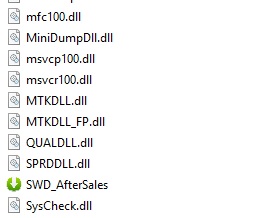
    1– Download & Unzip Tecno Flash tool Folder. Run SWD_AfterSales.
    techno tool
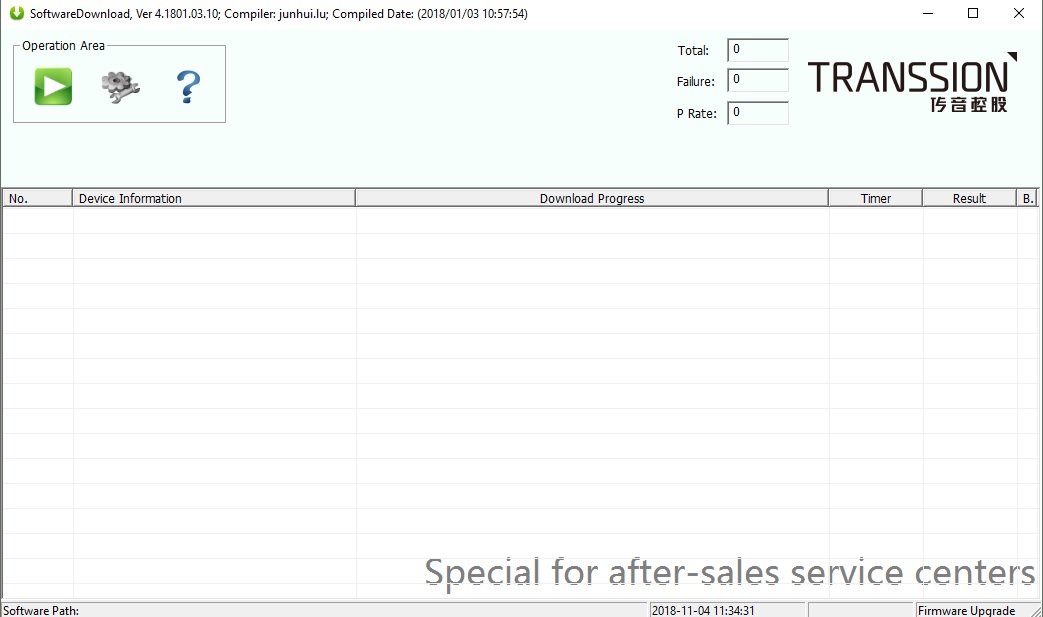
    2- It will launch Tecno Flash Tool.
    techno flash tool
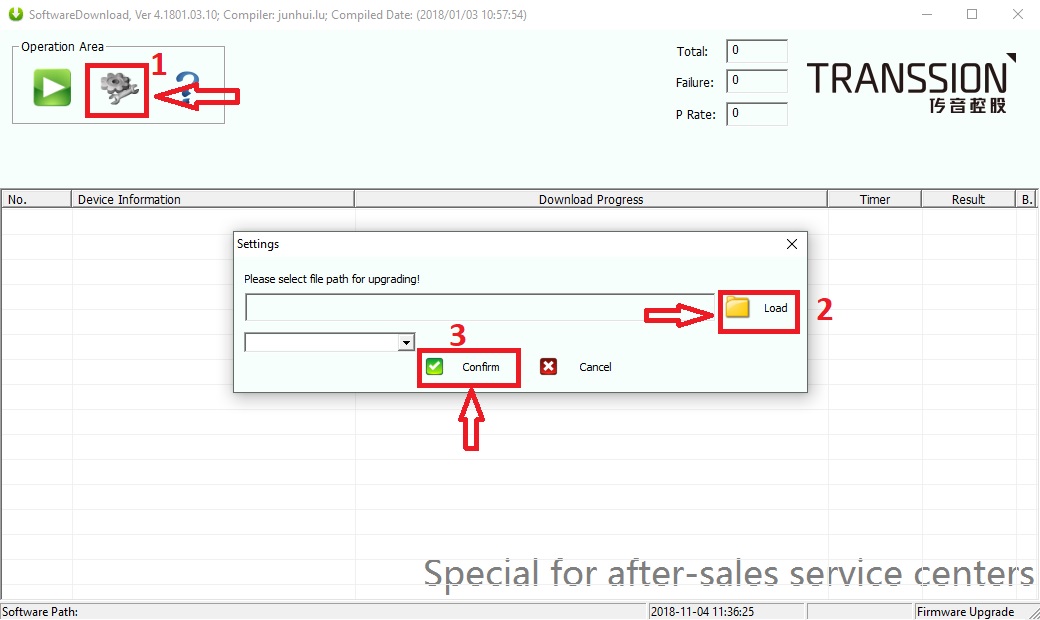
    3- Click on Setting then on Load, Choose Firmware and Click on Confirm.
    techno flash tool select firmware
    4- Click on Play Button. Switch off Phone & Connect it by Pressing Both Volume keys.
    5- Flashing will Start.
    Note: The first time it takes 5-10 minutes to boot.


Sunday, June 16, 2019

MRT latest V3.19

                             MRT V3.21


MRT V3.21 news!!!VIVO Update and Huawei DUB-AL00(DUB-XXXX) Support

https://drive.google.com/uc?id=1wochLaOakfwc_PtrL5wqJyPjeuX9W1s8&export=download

tThis new update add VIVO MT6771 CPU Boots
with this, if you enable adb and not CDC driver comes,you can unlock direct
select Model X21i_Function2 Y97_Function2 Z3i_Function_2 Y3_Function_2….
and click the software start button, hold vol up(boot)key for unlocking
support frp remove direct also!!!

New Update support Huawei Qualcomm DUB-AL00 DUB-TL00 DUB-AL29... 8.2.178 version unlock account frp...direct;need short edl pin to 9008
Mobile add in hw_flash tool!!!


RESIDENT EVIL 7 biohazard / BIOHAZARD 7 resident evil

Mi y1 miui diag port